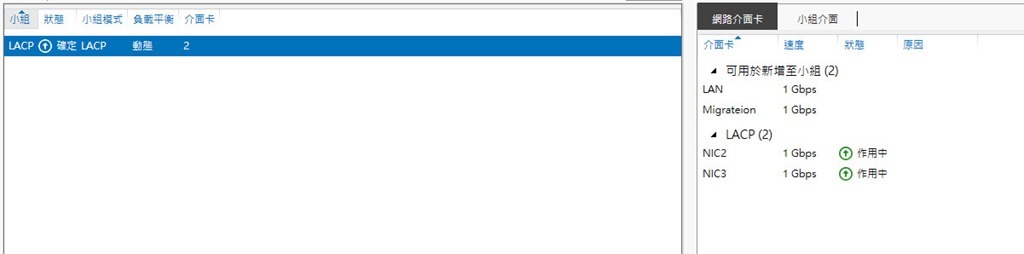
有一台windows 2022 Hyper-v 主機因有多張網卡,在cisco 交換器上設定了LACP,且在windows server 2022 建立了NIC TEAM
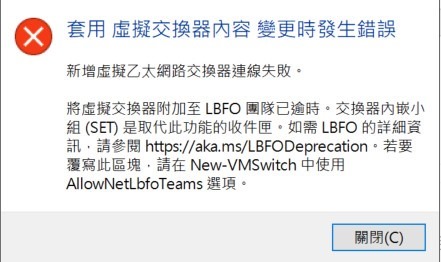
但是使用hyper-v 管理工具要建立虛擬交換器出現下列錯誤訊息
解決方式
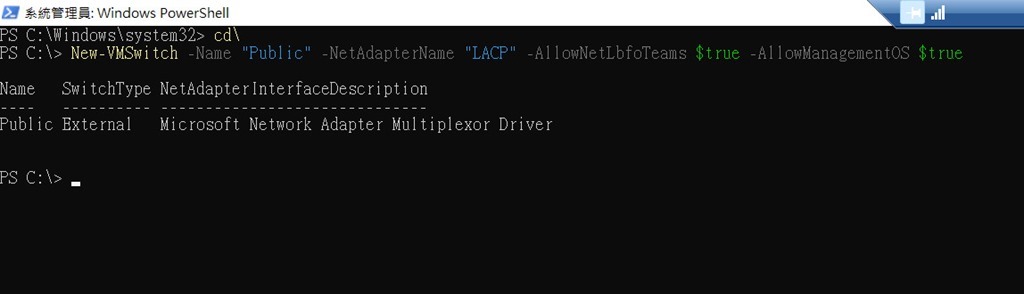
需要使用指令來創建就可以
New-VMSwitch -Name “VM-Network” -NetAdapterName “LACP” -AllowNetLbfoTeams $true -AllowManagementOS $true
參考
有一台windows 2022 Hyper-v 主機因有多張網卡,在cisco 交換器上設定了LACP,且在windows server 2022 建立了NIC TEAM
但是使用hyper-v 管理工具要建立虛擬交換器出現下列錯誤訊息
解決方式
需要使用指令來創建就可以
New-VMSwitch -Name “VM-Network” -NetAdapterName “LACP” -AllowNetLbfoTeams $true -AllowManagementOS $true
參考
之前經驗都是建立混合雲的方式導入M365
如果本來企業使用的是其他的郵件系統例如Linux , Hinet , gmail ,且已經又地端AD環境的情況所此次主要目的紀錄直接導入雲端M365並整合地端AD需要做的一些步驟.假設原來的郵件系統收發方式都是收信至outlook 成為PST檔案。
Fortinet 又出現漏洞
Fortinet addressed a critical buffer underwrite (‘buffer underflow’) vulnerability, tracked as CVE-2023-25610 (CVSS v3 9.3), that resides in the administrative interface in FortiOS and FortiProxy. A remote, unauthenticated attacker can exploit the vulnerability to execute arbitrary code on the vulnerable device and trigger a DoS condition on the GUI, by sending specifically crafted requests.
同事發問outlook 無法寄信,寄信時出現 Microsoft Outlook 很抱歉,發生一些問題,請在試一次。
因為目前所有信箱已經全不遷移至M365,一般同事離職後將AD帳號移動到非同步M365 OU 後,在M365平台會先通通放進「已刪除的使用者」中,而且預設是 30 天後才清掉。
公司有幾台伺服器是第三方軟體建置的終端機伺服器(TS-Plus),因前陣子微軟IE功臣身退主打edge,但畢竟大多同事還是用chrome比較多。
公司spam主機使用SYMANTEC MESSAGING GATEWAY ,在看mail佇列時發現
同事發給客戶的郵件寄不出去,錯問訊息 421 4.4.4 [internal] domain does not resolve